Help home Reminders and notifications
Reminders and notifications
Reminders help you remember to walk. You choose which ones you want, and when.
Which reminders can I get?
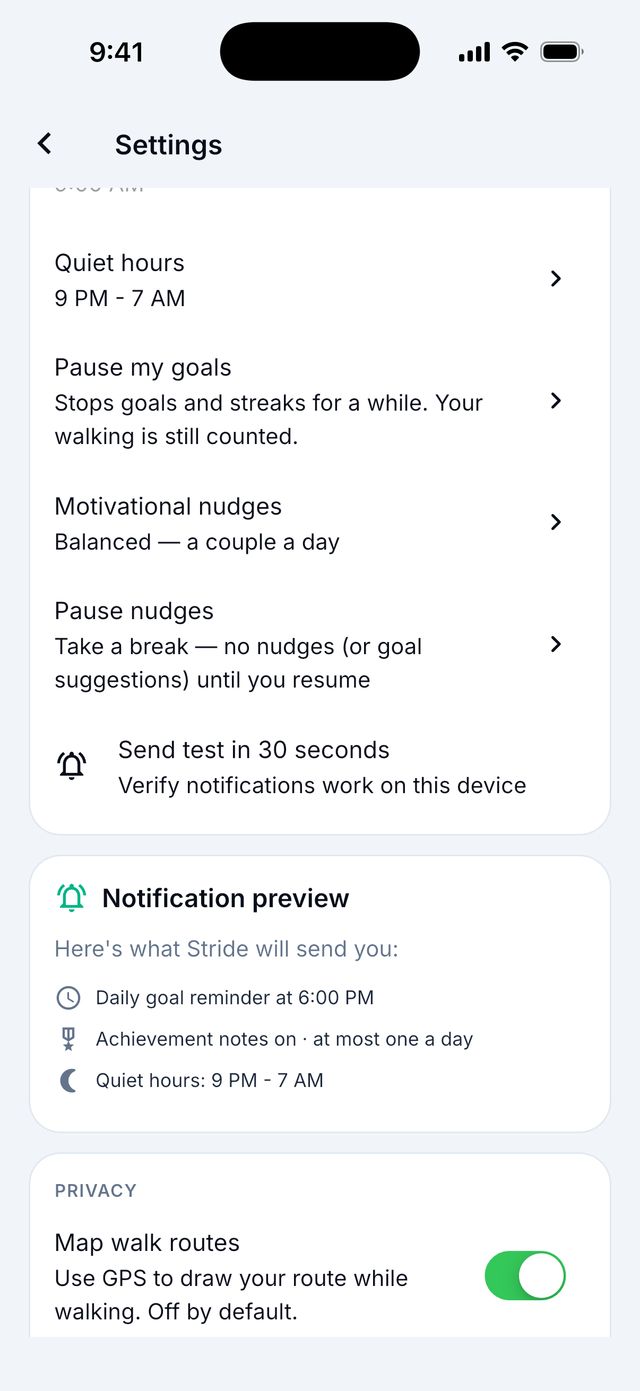
Open Settings › Notifications. You can turn each one on or off:
- Daily goal reminder: in the evening if you have not reached your goal. Choose the time.
- Evening invitation: a gentle note around 8 PM if the day still has room.
- Achievements: when you earn a badge.
- Daily check-in reminder: to ask how you feel.
- Quiet hours: no reminders at night.
- Motivational nudges (Premium): short tips. Choose how often: High, Balanced, Low or Off.
I don’t get any reminders. What can I do?
- Open Settings › Notifications in Siyan Stride.
- Tap Send test in 30 seconds. Wait.
- No message? Your phone may block Siyan Stride. Tap Open settings in the app, or open your phone’s Settings app › Notifications › Siyan Stride, and turn notifications on.
Tip: Check that Quiet hours and your phone’s Do Not Disturb are not hiding them.